Customizing the M365 Outlook Report Add-in
With the Microsoft Outlook Add-in reporting tool, you have the ability to report suspicious emails directly from your Outlook client and send them to Microsoft. By following the steps below, you can also customize M365 to send copies of the reported mails to a dedicated mailbox, which forwards them to SpamTitan for improved analysis.
Important
If you are using several CyberSentriq products, such as PhishTitan, then you already have the TitanHQ reporting tool in your M365 Outlook client and you do not need to customize the M365 Outlook Report Add-in for SpamTitan.
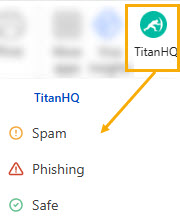
If this is the case, it is suggested that you use the TitanHQ reporting tool in Outlook instead of the Microsoft one. See Disable M365 Outlook Report Add-in for details on how to hide the M365 reporting tool in your Outlook client.
To customize M365 to send copies of reported emails directly from your Outlook client to SpamTitan, follow the steps below:
Create a Shared Mailbox: To receive copies of reported mails in a mailbox on your server.
Create an Exchange Connector. To forward reported mails from your mailbox to a specified SpamTitan server.
Create an Exchange Rule. To intercept reported mails and send them to the Exchange Connector.
Configure Microsoft Defender. To allow Exchange to send reported mails to a shared mailbox.
Note
The instructions below are for tools that are not owned or managed by TitanHQ and are only intended as a guideline to help you. As such, the information may be subject to change without us knowing.
If you notice anything incorrect, please email docs@titanhq.com and let us know.