
Adding IP Exemptions
Adding an Exemption for a sending email server IP allows you to select the security checks that you want to skip for that IP. This means that all emails from the that IP can bypass the selected security checks and be delivered to the intended recipient(s) without being flagged or auto-remediated.
If you want to add individual email addresses or domains as Exemptions, see Adding Email Exemptions or Adding Domain Exemptions.
Note
Ensure that the IPs you exempt from security check(s) are safe. IPs added to the Exemption list bypass the selected security checks and can reduce security coverage.
Exemptions created at the MSP level will apply to all customers.
If IPs are allowed by the system due to a match on the Exemptions list, the emails from that IP will be shown in Email History with the Status Clean.
Go to Email Security > Configuration > Exemptions where you'll see the All tab is open by default. You can add exemptions from here or select the IPs tab. Select Add Exemption.
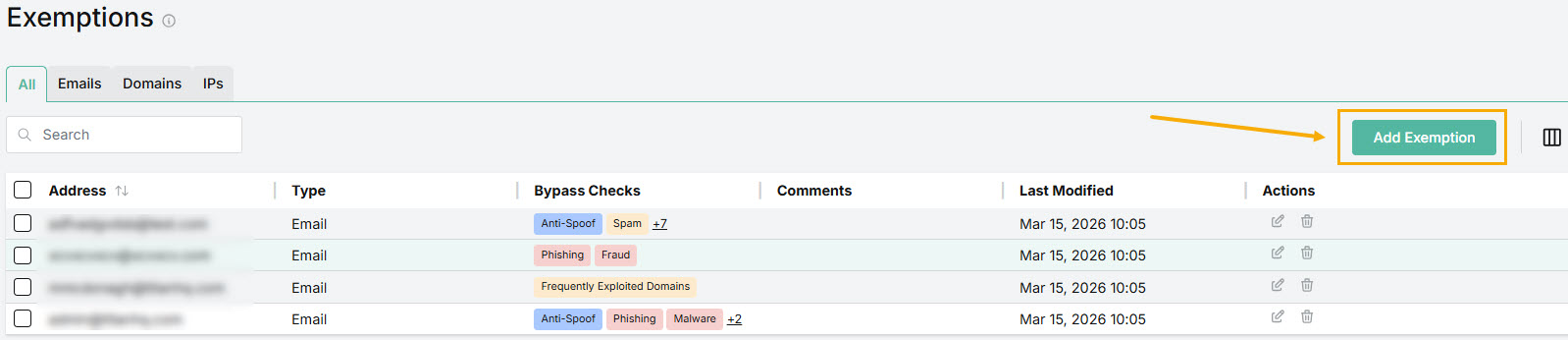
The Add Exemption window opens.
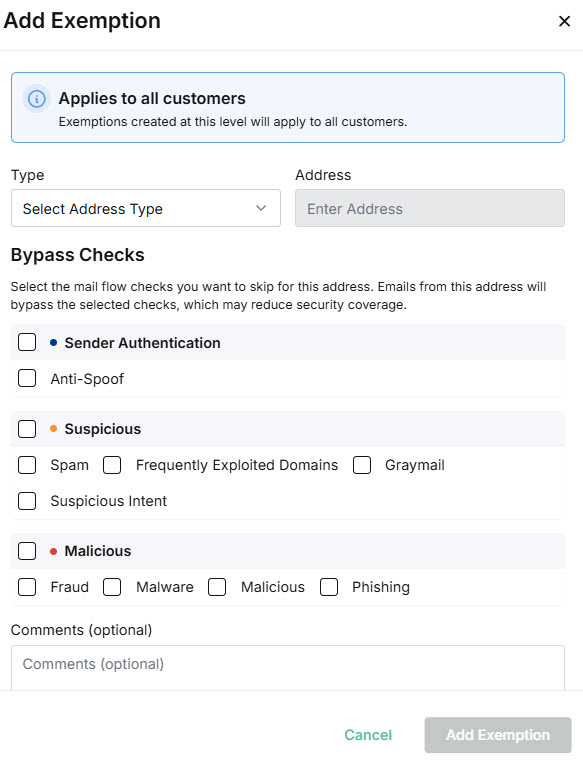
In the Add Exemption window, do the following:
Type: From the dropdown list, select IPs.
Address: Enter the IP address that you want to exempt from the selected mail flow checks.
Select the checkbox(es) for the mail flow check(s) you want to skip for this IP.
Sender Authentication
Anti-Spoof
Compares the sender's display name to tenant display names. If there's a match but the email address differs, the message is flagged.
Suspicious
Spam
Analyzes emails for patterns commonly associated with unsolicited messages.
Frequently Exploited Domains
Identifies emails from senders or domains commonly used in malicious attacks.
Graymail
Identifies legitimate but low-value emails, such as newsletters, promotions, or bulk notifications.
Suspicious Intent
Analyzes email content and behavior to detect signs of phishing, fraud, or social engineering
Malicious
Fraud
Detects emails that show signs of deceptive or malicious intent, such as impersonation, or payment scams.
Malware
Scam emails and attachments for malicious files, or code that could harm systems or data. Infected files may be delivered to users if this check is skipped.
Malicious
Identifies emails designed to cause harm, such as social engineering attempts.
Phishing
Detects emails that attempt to steal credentials, personal data, or sensitive information.
Comments (optional): Enter a description for the IP Address. This might include a reason for allowing the IP Address exemption.
Select Add Exemption.
The IP Address is displayed in your Exemptions list.