
Disable Link Lock in SpamTitan
The rewriting of URLs with Link Lock is built into the Email Security solution. If Link Lock is enabled as part of your SpamTitan service, it must be disabled to allow Email Security to process mail accurately.
Proceed based on your SpamTitan version:
Disable Link Lock in SpamTitan Skellig
An MSP Admin can follow the steps below to disable Link Lock for a customer in SpamTitan Skellig (9.00 or earlier).
Log into SpamTitan Skellig.
Select a customer from the All Customers table or the side bar menu to drill down to that customer level.
Go to Filtering > Link Lock.
Select Disabled to disable Link Lock for the selected customer.
Disable Link Lock in SpamTitan (Legacy)
Follow the steps below to disable Link Lock for a domain in SpamTitan (8.00 or earlier).
Log into SpamTitan.
Go to Content Filtering > Link Lock and scroll to the Configuration panel.
In the Domains table, select the edit
 icon in the Options column for the domain for which you want to disable Link Lock. You can also search for the domain from the Domains search box. The Edit Link Lock Configuration (Domain) window displays.
The Edit Link Lock Configuration (Domain) window displays.
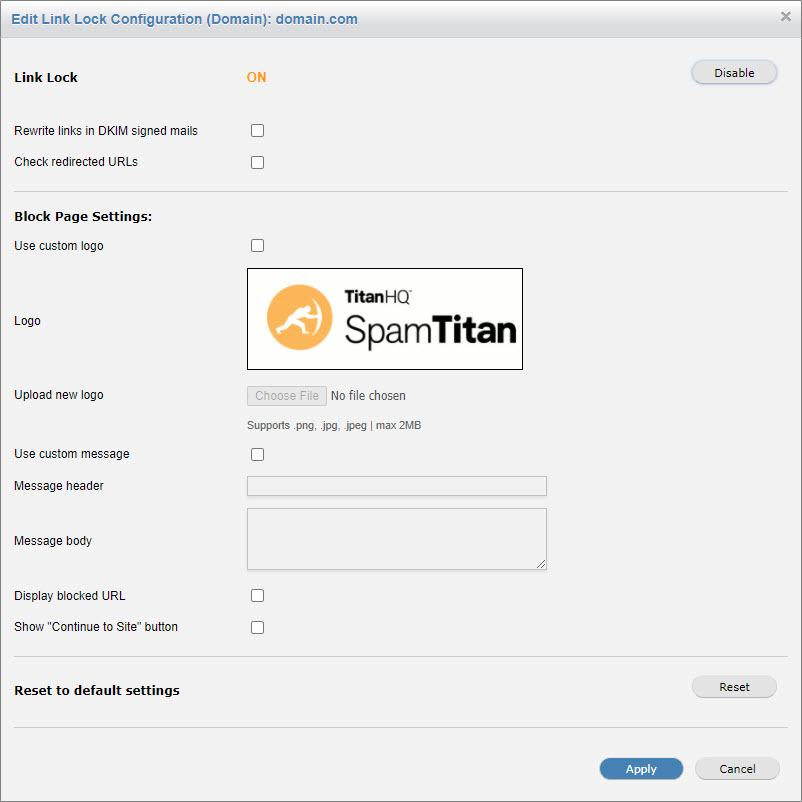
Select Disable to disable Link Lock, and then select Apply to save changes.